Street Trash III in GTA 6: the zombie minigame that works as a clip series
The zombie game on Jason's console in GTA 6 has an 18-minute timer, ability cards and an IGN reporter who spent almost four hours without beating it. Here's how to unlock it, how it works and why it makes a series, not a one-off clip.
Street Trash III in GTA 6: the zombie minigame that works as a clip series
Street Trash III: Dezombifier is the zombie shooter that runs on the console in Jason's house in GTA 6, and IGN just called it the best minigame in the game, saying the reporter spent almost four hours on it without beating it. My take for anyone who clips: this isn't material for a one-off clip, it's a series format, with a start, a timer and an ending everyone understands.
What is Street Trash III in GTA 6?
It's a top-down shooter with hordes of zombies, a timer and ability cards at every level. It runs on the JoySystem, the fake console under the TV in Jason's house in Key Lento, according to the Dork guide published on November 20. Some sites, including our first article about the games inside the game, called the console JoyStation; IGN and the guides use JoySystem.
The name shows up in two forms. The menu says "Street Trash 3: Dezombifier" and the title screen says "Street Trash III: Dezombifier", according to GTA6 Player Tools.
IGN says it's "clearly inspired" by Dead Nation, a zombie game Sony published in 2010, mixed with a card-based roguelike (a roguelike is a genre where you die, restart from scratch and learn a bit with each attempt). The reporter compares the power escalation to Vampire Survivors: the cards stack up fast and reward anyone who bets on a single ability.
It's one of four games inside GTA 6, according to Dork. The others include Tenebrae Lux, the lighthouse puzzle game (we have a full guide here), and Time Jackers Rewind, a top-down sci-fi shooter that IGN found the most forgettable of the three it tested. The "forget the lighthouse" in IGN's headline is a jab at Tenebrae Lux.
How do you unlock the zombie game?
It shows up in the Feng Shui mission in Chapter 1. According to Dork, Cal puts Street Trash III on the console after Jason gives up on Tenebrae Lux, and from then on the game stays on the JoySystem at home.
Three details from Dork that matter if you stream:
- The first run can't be won. Inside the Feng Shui mission, the timer ends with a cutscene no matter what. There's no point in the streamer getting killed trying to beat it there.
- The console disappears for a while. In part of Chapter 2, Jason can't access the console. It comes back for good in Chapter 3 and after the credits.
- There are also machines on the street. Dork says the game is on several of the 31 arcade machines scattered around Leonida. Only Dork gives that number, so treat it with caution until another guide confirms it.
How does a run work?
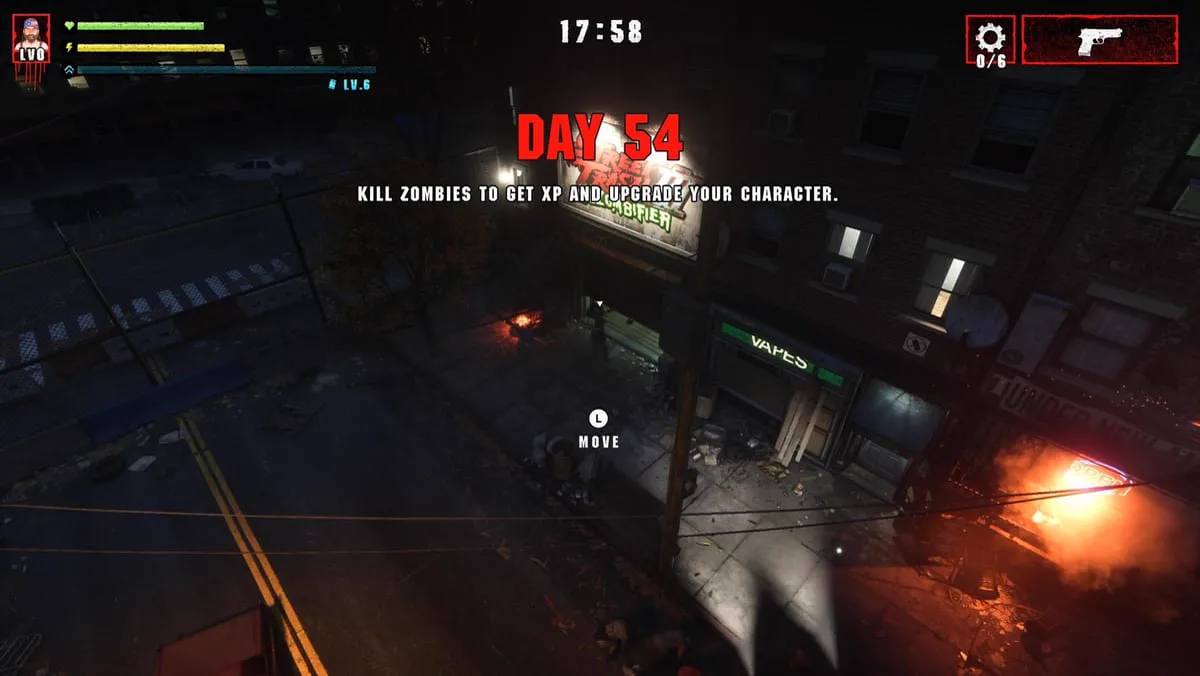
You have about 18 minutes to find six gears around the city, power up a building's elevator and go up before the city gets hit by a nuke. GTA6 Player Tools noted the timer starting at 17:58.
Collecting the six gears doesn't end the run. On the rooftop a new 6-minute countdown starts with the objective "Survive until extraction", and IGN says the final escape is by helicopter. Add it up and a successful run takes close to 24 minutes.
The cards are the heart of the game. Every zombie killed gives experience and every level offers three cards to choose from; you can reroll up to three times or skip, according to Dork. GTA6 Player Tools listed 18 cards in seven types. A few, with the effect described by Dork and GTA6 Player Tools:
| Card | What it does | Why it makes a clip |
|---|---|---|
| Blood Money | More experience per zombie | Levels go up fast, the build blows up early |
| Gear | Gives you a gear instantly | A shortcut that saves the run when time is almost out |
| Vampire | Heals when you deal damage, but no heart drops on the ground | A bet that pays off big or fails big |
| Auto Shotgun and Heavy Machine Gun | Swap the pistol for a heavy weapon for 30 seconds | The moment the screen turns to chaos |
IGN also mentions a rare card that doubles the damage you deal and the damage you take, and a card that raises critical hit chance by 50% while the character stands still, which the reporter went after once they read a builds thread on Reddit.
Why does it take hours to beat?
Because you die a lot, and the game is built for that. A round lasts about 24 minutes at most, but IGN describes frequent deaths, with each attempt teaching a bit more about the map. The reporter wrote that after almost four hours they still hadn't beaten it.
An Informant guide estimates about 5 minutes for the activity, a number that doesn't match the 18-minute timer that Dork and GTA6 Player Tools describe. I'm going with the timer.
There's no cash reward in the game. What you get is the Stick Fiddler trophy, for reaching the end of one of the console's games, which is in our GTA 6 trophy list.
What clip does the zombie minigame give you?
A series. A run has everything a vertical clip needs: a timer on screen, an objective anyone understands (six gears, go up, escape) and a clear ending, win or death. And since beating it takes hours, the streamer comes back to the game many times, and each return is an episode.
The clips I'd look for:
- The death seconds before the helicopter. The rooftop with the 6-minute countdown is the peak of tension. A clip of 20 to 40 seconds, starting with the clock running low.
- The card that broke the run. When the streamer picks the one that doubles damage both ways, or Vampire, and the bet pays off big or fails big.
- "Attempt number 12". A series with the attempt number in the title, posted in order. On YouTube, you can group the Shorts into a playlist.
- The build nobody knew about. A short card tutorial ("the card that gets you the win") answers a question players will have.
The catch is the same as with every minigame: in the first days, most streamers are busy with the story. Street Trash III becomes a topic when the campaign cools down and the audience asks for something new, and that's when having your clip ready counts. It also carries little spoiler risk, because it sits outside the missions; the only caution is the first run, inside Feng Shui, where you should clip only the game screen and leave the mission dialogue out, as we explain in GTA 6 spoilers and your clip.
And it has an advantage the missions don't: GTA 6 doesn't let you replay story missions, but the console in the living room is always there. Missed recording your best run? Play it again.
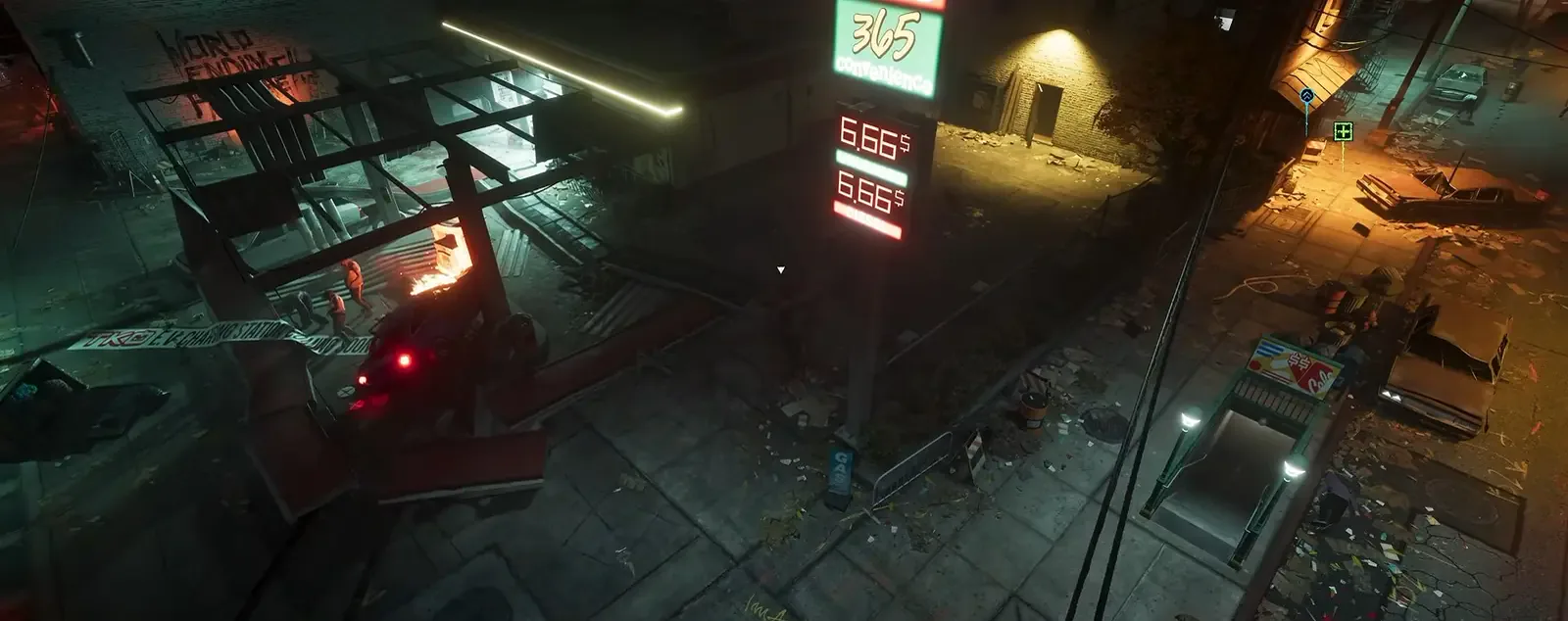
There's just one visual drawback: the camera sits high and the characters take up a small corner of the screen, as in the scene below. On a phone, without zooming in, nobody sees the zombie coming.
What to do from today
- Separate the minigame from the campaign. If you stream, announce the Street Trash III session as its own event, with a clear goal ("today I beat it"). If you clip other people's streams, note who is already playing.
- Let the AI find the run. In Cut.Pro, on "Generate clips", choose "Write it" under "What should we look for?" and describe something like "moments where he plays the zombie game on the console and dies, picks a card or reaches the rooftop". Save it as a preset and, under "Clip a livestream", on the streamer's channel, pick that preset in "Clip preset", in the "Settings" tab. It works best with streamers who narrate the run out loud. More examples in how to get AI to find the moments that become clips.
- Adjust the frame. A top-down game has tiny characters on screen, and on a phone they vanish. With the streamer's reaction, the layout with the webcam on top and a zoomed-in slice of the game on the bottom helps, and it's explained in GTA 6 clips with webcam on top and gameplay on the bottom.
- Number the series. Same title with the attempt number, in the same order on every platform.
My bet: Street Trash III will last longer on social than a lot of campaign missions. Rockstar put a whole game inside the game, and a game you lose easily and restart in seconds is the kind of thing that creates "just one more" on stream, and every "just one more" is a clip.
Frequently asked questions
How do you unlock the zombie game in GTA 6?
Street Trash III: Dezombifier first shows up in the Feng Shui mission in Chapter 1, when Cal puts the game on the JoySystem, the console under the TV in Jason's house in Key Lento. After that it stays available on the console at home, according to the Dork and GTA6 Player Tools guides. Dork warns that the console is out of reach for part of Chapter 2 and comes back in Chapter 3.
How long does it take to beat Street Trash III in GTA 6?
A run lasts up to about 24 minutes: roughly 18 on the timer to collect six gears, plus 6 more minutes surviving on the rooftop until extraction, according to GTA6 Player Tools. Beating it usually takes several runs, because dying is common. The IGN reporter said they spent almost four hours on the game and still hadn't beaten it.
Does beating the zombie game give you a trophy in GTA 6?
Yes, if it's the first console game you finish. The Stick Fiddler trophy unlocks when you reach the end of one of the JoySystem games, according to Dork and GTA6 Player Tools. There is no cash reward inside GTA 6.
Do clips of the GTA 6 zombie minigame have spoilers?
Almost none. Street Trash III sits outside the story missions, so a run doesn't reveal Jason and Lucia's plot. The only thing to watch is the first time, inside the Feng Shui mission: clip only the run and leave the mission dialogue out.