Discord now saves game clips on its own when your group laughs
Discord has started rolling out Auto Clips to Nitro subscribers on Windows: an AI on your PC listens to the call and saves the moment when the group bursts out laughing or screams. Here's how it works, the three-clip-per-session limit, what to consider about your friends' voices, and what's missing before a clip becomes a postable short.
Discord now saves game clips on its own when your group laughs
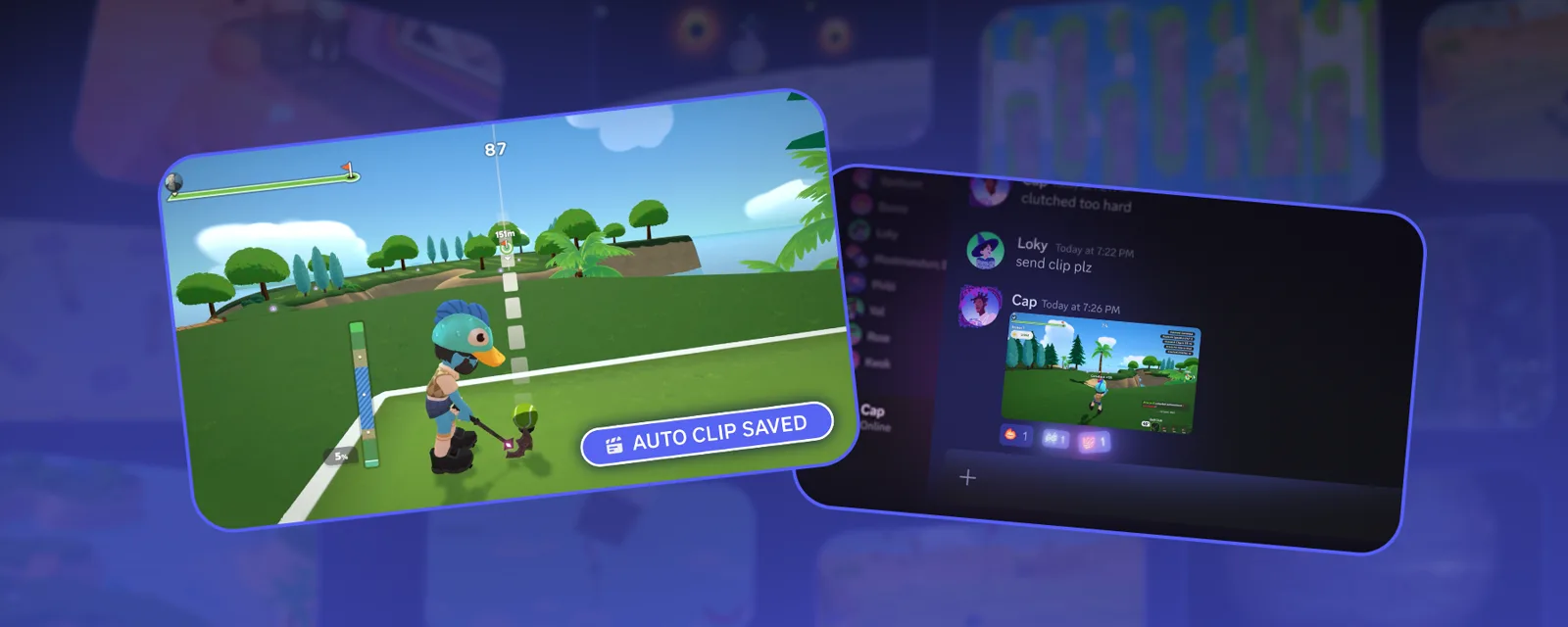
On Monday (November 23, 2026), Discord started rolling out Auto Clips, a feature that saves a clip of your gameplay without you pressing anything: when the group on the call bursts out laughing or screams, the moment gets saved. It's in early access for Nitro subscribers on the Windows app, according to the official announcement and Dexerto. If you post gameplay, it's a way to avoid missing the play, but the clip it produces is still far from a ready-to-post short.
How does Discord know the moment was funny?
It listens to the call, not to what you say. According to Discord, the voice audio is turned into a spectrogram (an image of sound over time), and a small model running on your PC's processor in real time recognizes the pattern of a laugh, a scream or a sudden spike of excitement in that image. The company says the model doesn't understand the conversation or identify who is speaking, and that the performance cost is similar to a regular recording program.

In four games you can skip the call: Counter-Strike 2, Dota 2, League of Legends and Rocket League have an integration that saves the clip based on match events (a kill, a goal, a round win). Dexerto says more titles are planned, without a list.
What are the limits?
The main one is quantity: a maximum of three highlights per game session, so it doesn't fill up your drive. Clips are saved on your PC and only leave it if you share them. Footage that didn't become a clip is discarded when the session ends, according to Dexerto.
Clips show up in Discord's Clips library, where you can trim the start and end, rename them, add text or an image on top, and remove the game or voice audio before sharing. Discord promises to later show clips on your profile and let a friend share their own clip of the same moment. And access for non-Nitro users is planned for 2027.
What about my friends' voices?
They can end up in the clip, since it's the group's laughter that triggers the recording. Each person can turn off Auto Clips, turn off clips for their own account, or stop their voice from appearing in other people's clips. Discord also shows an indicator when someone on the call has clips turned on.
The announcement doesn't say whether Auto Clips is on by default. For creators, the practical consequence is something else: a call clip with a friend's voice is content that belongs to more than one person. Posting it publicly without asking is the fastest way to lose the group you play with. PlayStation makes the same recommendation for voice chat on the PS5, as I showed in the guide to clipping recorded gameplay.
Does it work in Brazil?
There is no confirmation for Brazil yet. The announcement doesn't list countries, and Discord is in a particular situation in the Brazilian market: the ANPD has kept suspended Go Live, video calls and screen sharing since August. Auto Clips records your own PC's screen and doesn't stream anything to anyone, so in theory it isn't the same feature. But the order refers to "equivalent" video features, and Discord hasn't said how Auto Clips works for people in Brazil. If you have Nitro on Windows and you're in Brazil, open your settings over the next few weeks and check whether the clips tab shows the option.
What changes for people who post gameplay?
Capture changes, not editing. Until now, saving a play depended on someone remembering the hotkey in the middle of the screaming, and almost nobody does. Auto Clips solves that for the moment when the group laughs, which is usually the best part of the night. It's the same logic as picking the clip by the reaction, only done by sound and not by what was said.
What it doesn't solve:
- Three clips per session is a sample, not an archive. A three-hour night yields more than three good moments, and the criterion is how loud the laughter is, not whether the play makes sense on its own to someone who wasn't on the call.
- The clip comes out horizontal. For Shorts, TikTok and Reels it still needs vertical framing, captions and an opening that hooks viewers in the first few seconds.
- Nobody outside knows why you laughed. An inside joke gets laughs on the call and zero retention in the feed. That's the filter no sound detection applies.
- Windows and Nitro only. If you play on console, you still depend on the device's own capture, with the precautions I covered about automatic clip uploads on Xbox.
What to do now
If you have Nitro and play on Windows, turn on Auto Clips as a safety net, tell your group and agree on who is fine with appearing in the audio. Use the clips it saves as a map: they tell you at what minute of the night the best play happened.
For the real clip, record the whole session with your microphone in the capture. On Cut.Pro, you upload the file in "Cut video", the AI separates several moments based on speech, and you reframe to vertical with the "Full video" layout, which keeps the whole game frame; the step by step is in the guide to clipping recorded gameplay, which works the same for PC. From there, the same clip can go out on every network, adjusted for each one.
Auto Clips is good for not missing the play. Turning the play into a video that someone outside the group watches to the end is still your job.