Kling Image 4.0: 8K images and up to 2,000 characters of text in the artwork
Kuaishou launched Kling Image 4.0, an image model that promises native 8K, up to 2,000 characters inside the artwork and Portuguese among its supported languages. For now it's API only. Here's what changes for thumbnails and carousels, and how today's models already handle Portuguese text.
Kling Image 4.0: 8K images and up to 2,000 characters of text in the artwork
Kling AI, owned by China's Kuaishou, launched Kling Image 4.0 on Tuesday (Nov. 17). The image model promises native 8K and up to 2,000 characters of text inside a single piece of artwork, with Portuguese among the supported languages. For now, the announced access is through an API, for businesses and developers.
For anyone making thumbnails and carousels, long text matters more than 8K. I'll explain why, and show how the models that are already available handle artwork full of Portuguese text today.
What Kling Image 4.0 does, according to Kuaishou
The list below comes from the official description as reproduced by IT之家. The 8K, the 2,000 characters, the 10-image series and the long-format image also appear in Jiemian and the Daily Economic News:
- native 8K generation, the first in the Kling lineup at this resolution;
- up to 2,000 characters of text in a single image;
- a prompt of up to 15,000 tokens, enough for an entire campaign brief;
- more than 70 ready-to-use commercial fonts, plus the option to upload a reference image to copy the letter style;
- text in Simplified and Traditional Chinese, English, Japanese, Korean, Spanish and Portuguese;
- up to 10 consistent images from one description, each with a different focus (built for storyboards and product showcases);
- long-format images for online store product pages and website layouts;
- more than 110 ready-made color and lighting styles, or lighting copied from a reference photo.
Sina Finance adds that the model combines understanding and generation in the same architecture, so it can plan on its own what goes into each image of a series. None of the reports includes pricing, a performance comparison or an independent example. Everything above is the company's promise until someone tests it.
Where you can use it, and whether it works in Brazil
For now, only through an API. Kuaishou mentioned access for enterprise customers and developers, with no pricing and no mention of the Kling app or website. Platforms that resell models, such as Runware and Morphic, still list Kling Image 4.0 as "coming soon", and Runware says it will only publish pricing once the model goes live. In the Cut.Pro API it's already available, at 9 credits (R$ 0.48, Brazilian reais) per 2K image.
Resolution varies from place to place. Morphic lists only 2K and 4K, and Cut.Pro only 2K. If you want the 8K from the announcement, it will depend on where the model is offered.
Why 8K matters less than it sounds
Because no social network displays 8K. YouTube's help page recommends thumbnails at 3840 x 2160 pixels, which is 4K, with a limit of 50 MB from a computer and 2 MB from a phone. An 8K image has four times as many pixels as that and will be downsized either way, whether by you before uploading or by the platform. On Reels and TikTok, the image shows up on a phone screen.
8K helps with something else: cropping. If you generate a wide scene and pull the video cover, the carousel slide and the banner out of it, each crop still comes out sharp. It also makes a difference for printed material. For everyday posts, 2K does the job.
What changes with 2,000 characters
It changes the kind of artwork you can ask for in one go. A good thumbnail has three to five words, and current models already handle that well (the blog has covered the weight of the cover in how the clip cover decides the swipe and the title on the TikTok cover). Where they usually stumble is running text: the carousel with numbered tips, the infographic, the product page with specs.
Two thousand characters is roughly the size of a very dense carousel slide or an entire product page. Combined with series of up to 10 images, the request becomes "make all 10 slides of this carousel with this text" instead of generating them one by one and hoping the style matches.
Test: how current models handle Portuguese text
When I ran this test, Kling Image 4.0 wasn't yet in the Cut.Pro Generator. To set the bar it has to clear, I sent the same request to two models that were already there: a 4:5 carousel slide with the title "5 ERROS QUE DERRUBAM SEU CORTE" ("5 mistakes that sink your clip"), five numbered items and a footer, about 240 characters of Portuguese with accents and cedillas. Each image cost 6 credits and took about a minute.
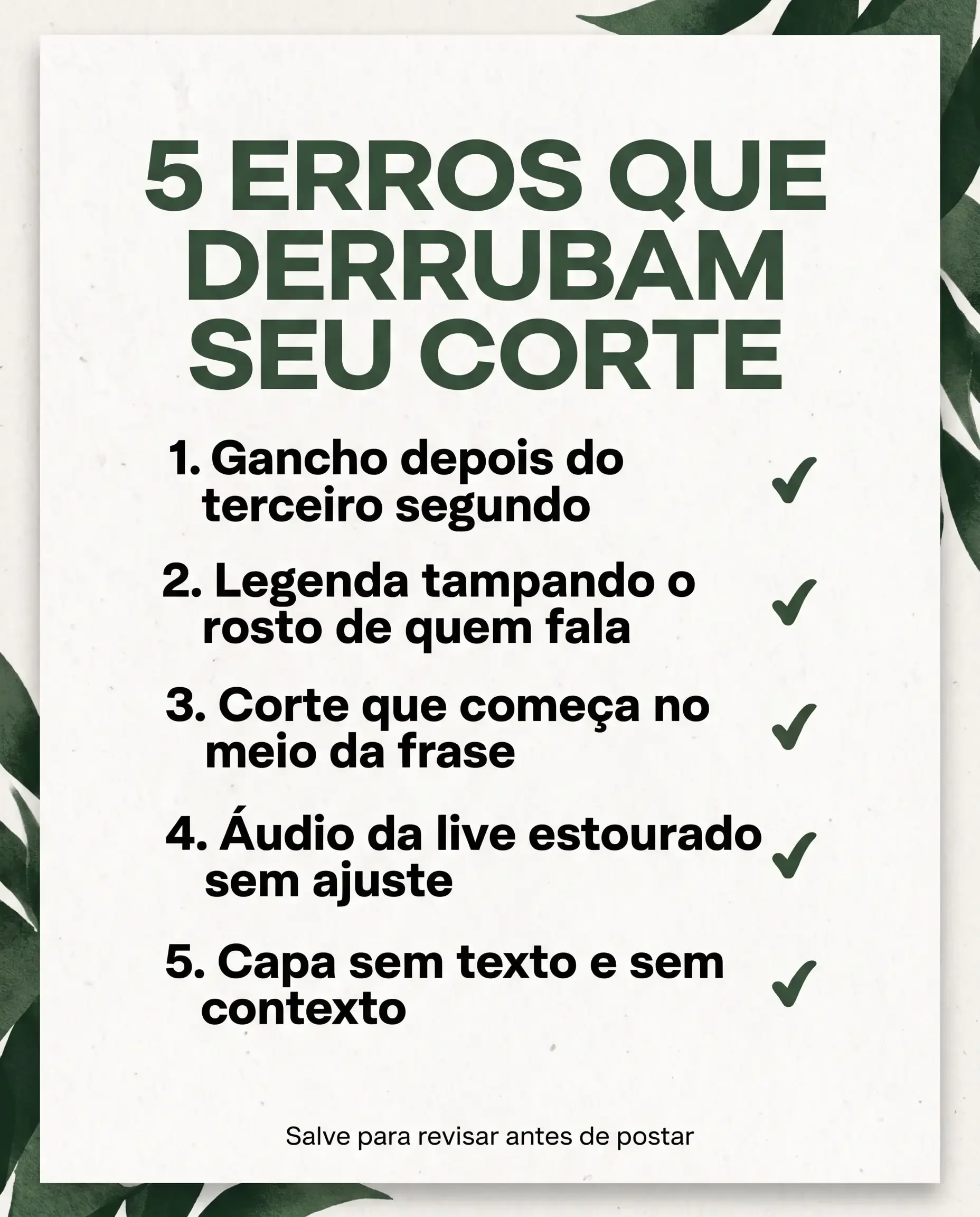
Nano Banana Pro got every letter right, including "Áudio" and "começa". But it invented a green check mark next to each mistake, which sends the opposite message (it looks like a list of approved things), and added decorative leaves I didn't ask for.
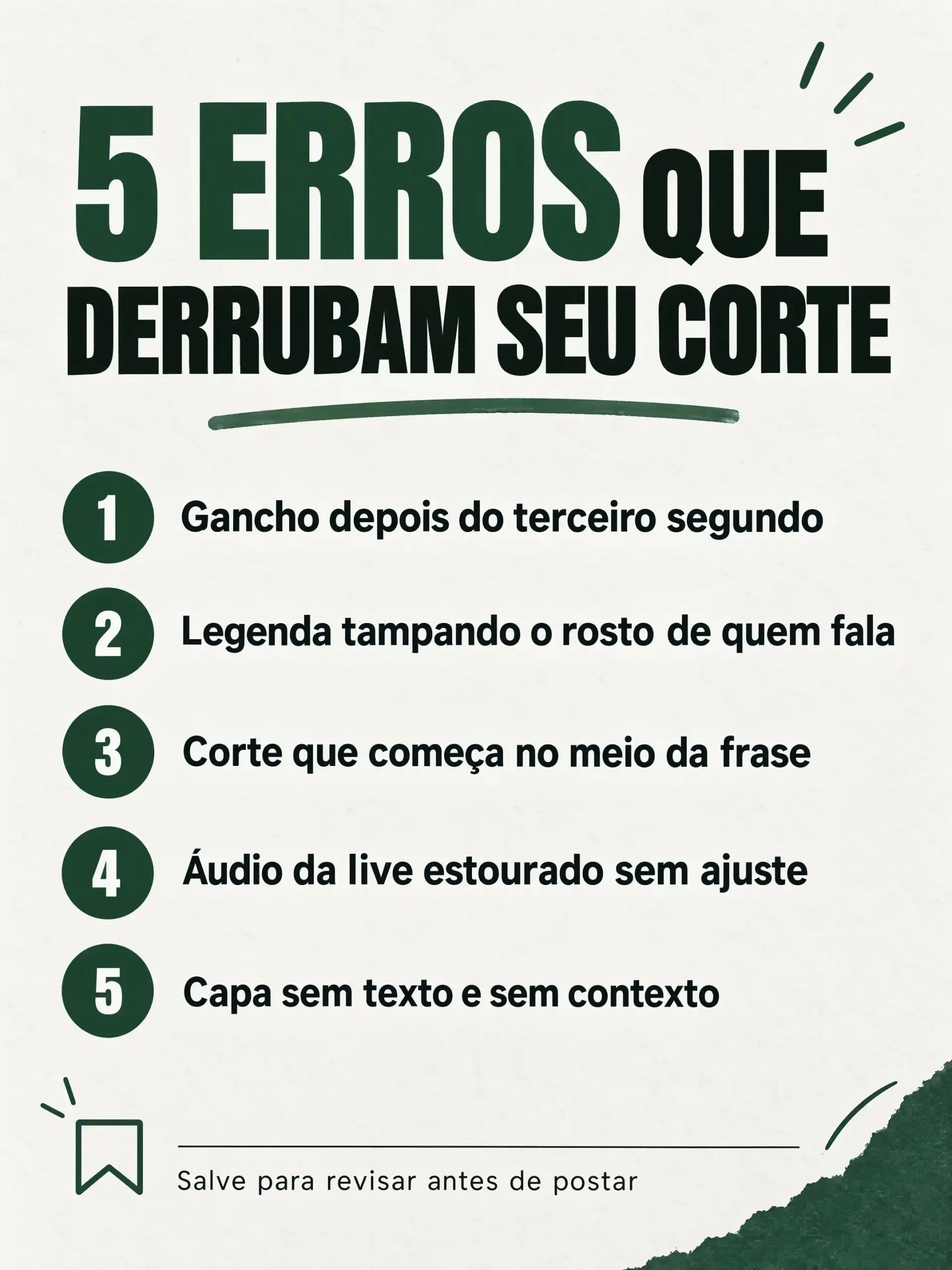
GPT Image 2.5 also wrote everything correctly and built a cleaner layout, with numbers in circles. On its own it added a save icon and a few decorative strokes, which actually fit the footer.
The takeaway is that 240 characters in Portuguese is no longer a problem for the top models. What still slips through is control: extra elements that change the meaning of the artwork. Kling Image 4.0 promises eight times more text. The right test for it is a slide with 1,500 characters, checking whether it stays error-free and free of invented decoration.
What to do now
If you produce carousels and thumbnails in volume, don't switch tools because of the announcement. For short Portuguese text, the Cut.Pro image generator already delivers with the current models, and the image can serve as the starting frame for the Generator's own video models (see the Kling 4.0 vs. Seedance 2.5 comparison).
Three precautions apply to any model:
- Put the exact text in quotes in the prompt and say "no other text". Without that, the model invents dates, credits and words.
- Check accents and cedillas before posting. An "AUDIO" without the accent on the cover costs more credibility than it seems.
- If you're testing cover variations, use YouTube's thumbnail A/B test instead of picking by eye.
The next step is to run this long-text test on Kling Image 4.0 and update this post with the result.